---
title: “Ghost Device” Issue – Device Appears Paired but Doesn’t Work
description: Sometimes a device may appear in the Lightwave app as if it has been successfully paired, but it does not respond or control anything. This is known as a “ghost device”, and it usually happens when a Smart Series device is accidentally added as a Connect Series device.
---
[Skip to content](https://support.lightwaverf.com/knowledge/-ghost-device-issue-device-appears-paired-but-doesnt-work#main-content)
Open main navigation
Close main navigation
- [WhatsApp: +44 7480 784990](https://wa.me/+447480784990)
[WhatsApp: +44 7480 784990](https://wa.me/+447480784990)
How can we help you?
- There are no suggestions because the search field is empty.
1. [Help Center](https://support.lightwaverf.com/knowledge?hsLang=en)
2. [Troubleshooting](https://support.lightwaverf.com/knowledge/troubleshooting?hsLang=en)
3. [General](https://support.lightwaverf.com/knowledge/troubleshooting?hsLang=en#general)
# “Ghost Device” Issue – Device Appears Paired but Doesn’t Work
## Sometimes a device may appear in the Lightwave app as if it has been successfully paired, but it does not respond or control anything. This is known as a “ghost device”, and it usually happens when a Smart Series device is accidentally added as a Connect Series device.
#### 📱 How This Happens
On the **Link Device screen**, there are multiple pairing options.
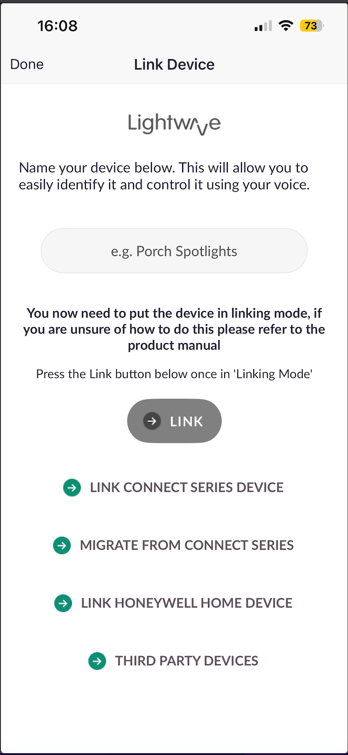
You may accidentally select:
• **“Link Connect Series Device”** (used for older 1st generation devices manufactured between 2009-2019 and discontinued in 2019)
Instead of using the correct method:
• Entering a name in the **top text box** and pressing **Link** (for Smart Series devices)
---
#### ⚠️ Why This Causes an Issue
Connect Series devices do **not report their status back to the app**.
Because of this:
• The app will still add the device
• It looks like it has paired successfully
• But it will **not respond or function correctly**
👉 This creates the “ghost device” effect.
---
#### ✅ How to Fix a Ghost Device
#### 1. Go to the device in the Lightwave app
2\. Press and hold on the tile for the device in the app
3\. Open **device settings** located in the top right hand side of the screen
4\. Scroll down to the bottom and select **Delete Device**
Once removed, you can pair it again correctly.
---
#### 🔁 How to Pair the Device Correctly
1. Press the big green plus button at the bottom of the screen in the middle
2. Select devices
3. Enter a name in the **top text box** (e.g. Porch Spotlights)
4. Put the device into [**linking mode**](https://support.lightwaverf.com/knowledge/how-to-put-your-devices-into-pairing-mode?hsLang=en)
5. Press the **green Link button** underneath the name box.
✅ Do **not** use “Link Connect Series Device” for Smart Series devices.
---
#### ❗ Why Your Device Didn’t Link the First Time
If the device failed to pair initially, it’s usually due to one of the following:
### 1. 🔴 Memory Full
• The device will **flash red in linking mode**
• It cannot pair again until reset
**Fix:**
• Perform a [**master reset**](https://support.lightwaverf.com/knowledge/master-resetting-our-devices?hsLang=en) on the device
• Delete it from the app (if already added)
• Then try pairing again
---
### 2. 📡 Device Too Far from the Hub
• Signal may be too weak to complete pairing
**Fix:**
• Move your **Link Plus hub** higher
• Reduce distance between the hub and device
👉 Higher placement improves signal coverage significantly. The Link Plus does require a hard wired internet connection which may limit where you can position it, however many wifi boosters have ethernet ports on them so you can connect hard wired devices into them giving you more flexibility
---
#### ✅ Summary
• A “ghost device” happens when a Smart Series device is added as a **Connect Series device**
• The device appears in the app but does **not work**
• Delete the device and pair it again using the **top “Link” option**
• Always ensure the device is in **linking mode**, within range, and not flashing red which indicates a master reset is needed before initiating pairing
- [What do I need? & System Setup](https://support.lightwaverf.com/knowledge/what-do-i-need-system-setup?hsLang=en#main-content)
- [Getting started on the Lightwave App](https://support.lightwaverf.com/knowledge/what-do-i-need-system-setup?hsLang=en#getting-started-on-the-lightwave-app)
- [Lighting](https://support.lightwaverf.com/knowledge/what-do-i-need-system-setup?hsLang=en#lighting)
- [Heating](https://support.lightwaverf.com/knowledge/what-do-i-need-system-setup?hsLang=en#heating)
- [Automations](https://support.lightwaverf.com/knowledge/what-do-i-need-system-setup?hsLang=en#automations)
- [Third Party Integrations](https://support.lightwaverf.com/knowledge/what-do-i-need-system-setup?hsLang=en#third-party-integrations)
- [FAQ's](https://support.lightwaverf.com/knowledge/what-do-i-need-system-setup?hsLang=en#faqs)
- [Advanced Features](https://support.lightwaverf.com/knowledge/what-do-i-need-system-setup?hsLang=en#advanced-features)
- [App Guidance & Automations](https://support.lightwaverf.com/knowledge/app-guidance-automations?hsLang=en#main-content)
- [My Account](https://support.lightwaverf.com/knowledge/app-guidance-automations?hsLang=en#my-account)
- [App Guidance](https://support.lightwaverf.com/knowledge/app-guidance-automations?hsLang=en#app-guidance)
- [Automations](https://support.lightwaverf.com/knowledge/app-guidance-automations?hsLang=en#automations)
- [Troubleshooting](https://support.lightwaverf.com/knowledge/troubleshooting?hsLang=en#main-content)
- [General](https://support.lightwaverf.com/knowledge/troubleshooting?hsLang=en#general)
- [Lighting](https://support.lightwaverf.com/knowledge/troubleshooting?hsLang=en#lighting)
- [Heating](https://support.lightwaverf.com/knowledge/troubleshooting?hsLang=en#heating)
- [Power](https://support.lightwaverf.com/knowledge/troubleshooting?hsLang=en#power)
- [Automations & Hub](https://support.lightwaverf.com/knowledge/troubleshooting?hsLang=en#automations-hub)
- [Installation Guides](https://support.lightwaverf.com/knowledge/installation-guides?hsLang=en#main-content)
- [Link Plus Hub](https://support.lightwaverf.com/knowledge/installation-guides?hsLang=en#link-plus-hub)
- [Lighting](https://support.lightwaverf.com/knowledge/installation-guides?hsLang=en#lighting)
- [Power](https://support.lightwaverf.com/knowledge/installation-guides?hsLang=en#power)
- [Relays](https://support.lightwaverf.com/knowledge/installation-guides?hsLang=en#relays)
- [Heating](https://support.lightwaverf.com/knowledge/installation-guides?hsLang=en#heating)
- [Connect Series Support Archive](https://support.lightwaverf.com/knowledge/connect-series-support-archive?hsLang=en#main-content)
- [General](https://support.lightwaverf.com/knowledge/connect-series-support-archive?hsLang=en#general)
- [Lighting](https://support.lightwaverf.com/knowledge/connect-series-support-archive?hsLang=en#lighting)
- [Heating](https://support.lightwaverf.com/knowledge/connect-series-support-archive?hsLang=en#heating)
- [Power](https://support.lightwaverf.com/knowledge/connect-series-support-archive?hsLang=en#power)
- [Contact Us](https://support.lightwaverf.com/knowledge/contact-us?hsLang=en#main-content)
- [Product Returns](https://support.lightwaverf.com/knowledge/contact-us?hsLang=en#product-returns)
- [Contact Us](https://support.lightwaverf.com/knowledge/contact-us?hsLang=en#contact-us)
[-1.png?width=58&height=24&name=Lightwave%20Logo%20Green%20Small%20(320%20x%20132)-1.png "Chill listening crop-3")](http://lightwaverf.com)
[mailto:email@email.com](mailto:email@email.com)
Copyright © 2025, Lightwave