---
title: How to Fix a Smart Socket That Isn't Updating
description: This article addresses a common issue where Smart Sockets (LP42, LP42IP, & LP40) fail to update, despite a pending firmware update
---
[Skip to content](https://support.lightwaverf.com/knowledge-base/my-smart-socket-is-not-updating-what-can-i-do#main-content)
Open main navigation
Close main navigation
How can we help you?
- There are no suggestions because the search field is empty.
1. [Help Center](https://support.lightwaverf.com/knowledge-base?hsLang=en)
2. [Troubleshooting](https://support.lightwaverf.com/knowledge-base/troubleshooting?hsLang=en)
3. [Power](https://support.lightwaverf.com/knowledge-base/troubleshooting?hsLang=en#power)
- [Getting Started - What you need to know](https://support.lightwaverf.com/knowledge-base/getting-started-what-you-need-to-know?hsLang=en#main-content)
- [Getting started on the Lightwave App](https://support.lightwaverf.com/knowledge-base/getting-started-what-you-need-to-know?hsLang=en#getting-started-on-the-lightwave-app)
- [Lighting](https://support.lightwaverf.com/knowledge-base/getting-started-what-you-need-to-know?hsLang=en#lighting)
- [Heating](https://support.lightwaverf.com/knowledge-base/getting-started-what-you-need-to-know?hsLang=en#heating)
- [Third Party Integrations](https://support.lightwaverf.com/knowledge-base/getting-started-what-you-need-to-know?hsLang=en#third-party-integrations)
- [General](https://support.lightwaverf.com/knowledge-base/getting-started-what-you-need-to-know?hsLang=en#general)
- [App Guidance & Automations](https://support.lightwaverf.com/knowledge-base/app-guidance-automations?hsLang=en#main-content)
- [My Account](https://support.lightwaverf.com/knowledge-base/app-guidance-automations?hsLang=en#my-account)
- [App Guidance](https://support.lightwaverf.com/knowledge-base/app-guidance-automations?hsLang=en#app-guidance)
- [Automations](https://support.lightwaverf.com/knowledge-base/app-guidance-automations?hsLang=en#automations)
- [Troubleshooting](https://support.lightwaverf.com/knowledge-base/troubleshooting?hsLang=en#main-content)
- [General](https://support.lightwaverf.com/knowledge-base/troubleshooting?hsLang=en#general)
- [Lighting](https://support.lightwaverf.com/knowledge-base/troubleshooting?hsLang=en#lighting)
- [Heating](https://support.lightwaverf.com/knowledge-base/troubleshooting?hsLang=en#heating)
- [Power](https://support.lightwaverf.com/knowledge-base/troubleshooting?hsLang=en#power)
- [Automations & Hub](https://support.lightwaverf.com/knowledge-base/troubleshooting?hsLang=en#automations-hub)
- [Installation Guides](https://support.lightwaverf.com/knowledge-base/installation-guides?hsLang=en)
- [Connect Series Support Archive](https://support.lightwaverf.com/knowledge-base/connect-series-support-archive?hsLang=en)
- [Contact Us](https://support.lightwaverf.com/knowledge-base/contact-us?hsLang=en#main-content)
- [Product Returns](https://support.lightwaverf.com/knowledge-base/contact-us?hsLang=en#product-returns)
- [Contact Us](https://support.lightwaverf.com/knowledge-base/contact-us?hsLang=en#contact-us)
# How to Fix a Smart Socket That Isn't Updating
## This article addresses a common issue where Smart Sockets (LP42, LP42IP, & LP40) fail to update, despite a pending firmware update
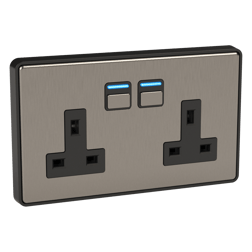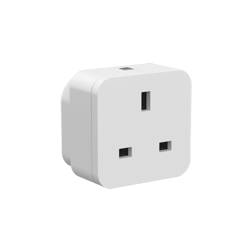
There are two primary scenarios that can cause this issue, depending on whether the socket is newly installed or has been in use for some time:
**New Socket**
To pair a new socket with the app, press and hold one of the buttons to initiate pairing mode. A helpful video guide is available [here](https://youtu.be/FsrCNslg6sE?t=78). However, if both buttons are pressed simultaneously during the pairing process, the socket might appear to connect to the app without completing the pairing successfully. In this case, a firmware update is required. To resolve the issue, [remove the socket from the app](https://support.lightwaverf.com/knowledge/how-to-delete-a-device-and-automation-from-the-linkplus-app?hsLang=en), [perform a master reset on the device](https://youtu.be/n21DrOamWZI?t=9), and then [attempt to pair it again](https://support.lightwaverf.com/knowledge/how-to-add-a-device-to-the-link-plus-app?hsLang=en). Once completed, the smart socket will update accordingly.
**Existing Socket**
Sometimes a device may undergo an unintentional master reset. When this happens, the app will display a red triangle next to the device with the message “Unpaired,” indicating that the socket has been reset. To fix this, [remove the socket from the app](https://support.lightwaverf.com/knowledge/how-to-delete-a-device-and-automation-from-the-linkplus-app?hsLang=en) and [proceed with re-pairing it](https://support.lightwaverf.com/knowledge/how-to-add-a-device-to-the-link-plus-app?hsLang=en).
Additionally, connectivity issues might occur if the socket is located too far from the Link Plus. A weak RF signal from an improperly positioned Link Plus can hinder proper updates to the socket. To improve connectivity, place your Link Plus in an optimal location—ideally, higher and more central, as RF signals tend to propagate downward more effectively.
If you continue to experience issues, feel free to call us at 0121 250 3625 (option 2). Our support team is available Monday to Friday, from 9 am to 5 pm.
[](http://lightwaverf.com)
[mailto:email@email.com](mailto:email@email.com)
Copyright © 2025, Lightwave